
Why Smartphone Cameras Are Always on the Left Side?
Ever wondered why smartphone cameras are usually placed on the left side? Discover the science, design logic, selfie mystery, and common camera mistakes users make.
Why Smartphone Cameras Are Always on the Left Side?
Smartphones have become such an important part of our daily lives that most people use them without ever noticing the small design decisions behind them. From making calls and clicking photos to attending online classes, making payments, editing videos, and scrolling through social media — modern smartphones are practically mini computers in our pockets.
But have you ever stopped to notice one interesting detail?
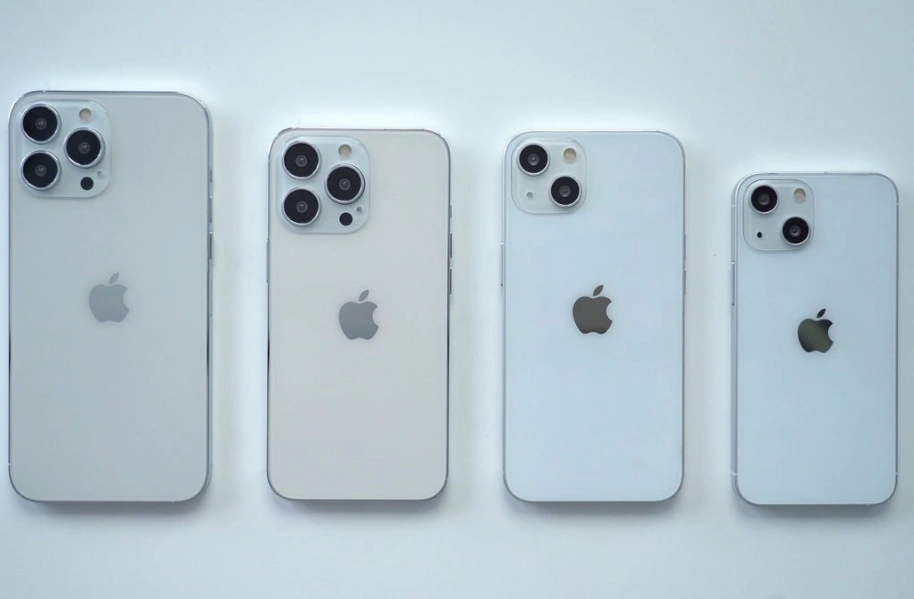
In most smartphones, the rear camera module is placed on the left side, especially when you hold the phone vertically. Whether it is an Android device or an iPhone, the camera placement often follows a similar pattern.
This may look like a simple design choice, but there are actually several practical, ergonomic, and engineering reasons behind it. The same goes for another common mystery: why selfies often appear reversed after being clicked.
Let’s understand the science, psychology, and real-world usability behind smartphone camera placement in a simple and engaging way.
The Evolution of Smartphone Cameras
In the early days, mobile phones were designed mainly for calling and texting. Cameras were either absent or extremely basic. As smartphone technology evolved, cameras became one of the biggest selling points for users.
Today, people buy smartphones based on:
- Camera quality
- Video recording features
- Selfie performance
- AI photography
- Zoom capabilities
- Stabilization technology
Since cameras now play a major role in smartphone usage, companies carefully design their position for comfort and better usability.
Why Is the Smartphone Camera Usually on the Left Side?
1. Most People Use Their Right Hand
The biggest reason behind left-side camera placement is simple human behavior.
Globally, a large majority of people are right-handed. When a person holds a smartphone in their right hand, the grip naturally leaves the top-left portion of the phone relatively unobstructed.
This helps in:
- Taking photos comfortably
- Recording stable videos
- Avoiding accidental finger blocking
- Holding the phone securely
If the camera were placed on the right side, users’ fingers would often cover the lens while clicking pictures.
Smartphone companies spend millions studying user behavior, and hand positioning is one of the most important factors in mobile design.
2. Better Experience in Landscape Mode
Another important reason involves landscape photography and videography.
When people shoot videos, watch content, or play games, they usually rotate their phone horizontally. In this landscape position, a left-side camera automatically shifts toward the upper corner.
This creates several advantages:
- Fingers stay away from the lens
- Videos become more stable
- Camera angle feels natural
- Grip improves during recording
This is especially useful for:
- YouTubers
- Vloggers
- Mobile filmmakers
- Gamers
- Travelers
Imagine recording a video while your finger accidentally covers the camera lens — it would ruin the entire footage. Left-side placement reduces this problem significantly.
Also read: OnePlus Nord 6 Review: Performance Beast with Huge Battery
3. Internal Hardware Arrangement Matters
Camera placement is not only about comfort. It also depends on the internal layout of smartphone components.
Inside every smartphone, manufacturers must fit:
- Battery
- Processor
- Cooling system
- Speakers
- Charging components
- Motherboard
- Antennas
- Wireless charging coils
The top-left corner often provides the most efficient space for camera modules without disturbing other important components.
Modern camera sensors are also becoming larger and more powerful. Some flagship phones now include:
- Periscope zoom lenses
- Optical image stabilization
- Large sensor systems
- AI imaging chips
These parts require careful engineering. The left-side placement helps manufacturers organize components efficiently inside a very compact body.
4. Human Eye Movement and Framing Psychology
Interestingly, user psychology also plays a role.
Studies in visual behavior suggest that many users naturally frame objects slightly toward the center-right while taking photos. A left-positioned camera aligns well with this habit and allows easier scene composition.
Professional photographers also prefer layouts that feel balanced during framing. Smartphone companies use similar principles to improve the user experience subconsciously.
5. Easier Finger Reach for Camera Controls
When users open the camera app, their thumbs naturally rest toward the right side of the screen. This makes it easier to access shutter buttons, zoom sliders, and recording controls while the camera sensor remains on the opposite side.
This balance improves one-handed usability, especially on large-screen smartphones.
Why Do Selfie Photos Sometimes Appear Reversed?
Another common smartphone mystery is mirrored selfies.
When you look into the front camera preview, the image behaves like a mirror. If you raise your right hand, the preview also raises the right-side image. This feels natural because humans are used to mirrors.
However, after taking the photo, many smartphones save the image in its actual orientation instead of the mirrored preview. As a result:
- Text appears corrected
- Facial sides switch
- Background alignment changes
This often makes users feel that the image looks “different” from what they saw before clicking.
Why Smartphones Mirror Selfies
The mirrored preview exists mainly for comfort.
If the front camera did not behave like a mirror:
- Movements would feel confusing
- Framing selfies would become difficult
- Hand coordination would feel unnatural
That’s why smartphones show a mirrored preview while clicking selfies.
Some devices also offer a feature called:
- “Mirror Front Camera”
- “Save Selfies as Previewed”
- “Flip Selfie”
Users can enable or disable it according to preference.
How Smartphone Design Impacts Daily Life
Many users think smartphone design is only about appearance, but every detail affects real-life usage.
A poorly placed camera can lead to:
- Blurry photos
- Fingerprints on the lens
- Uncomfortable grip
- Unstable videos
- Poor gaming experience
This is why smartphone companies test thousands of prototypes before launching a final design.
Even tiny adjustments in camera placement can improve:
- Photography comfort
- Heat management
- Device balance
- Durability
- User satisfaction
Future Smartphone Camera Placement Trends
As smartphone technology advances, camera placement may continue evolving.
Some future possibilities include:
Under-Display Cameras
Cameras hidden beneath the screen for a cleaner look.
Center-Aligned Camera Systems
More symmetrical camera layouts for foldable devices.
AI-Assisted Multi-Angle Cameras
Phones using multiple sensors to automatically adjust framing.
Modular Cameras
Attachable professional-grade lenses for advanced photography.
Still, ergonomics will remain a major factor. Companies will continue prioritizing designs that feel natural in human hands.
Also read: OPPO F31 Pro+ 5G Review – Battery & Durability Tested
Mistakes to Avoid While Using Smartphone Cameras
Many users unknowingly reduce photo quality because of simple mistakes. Here are some real-life camera handling errors you should avoid.
1. Blocking the Lens with Fingers
This happens very often in landscape mode. Users accidentally place fingers near the top-left corner, partially covering the camera.
Solution:
Always check finger placement before recording videos or taking pictures.
2. Ignoring Lens Cleaning
Pocket dust, fingerprints, and oil marks can make photos blurry.
Real-Life Example:
Many people think their camera quality has become bad, while the actual issue is just a dirty lens.
Solution:
Use a microfiber cloth regularly to clean the camera.
3. Holding the Phone Incorrectly
An unstable grip leads to shaky photos and blurry night shots.
Solution:
Use both hands or stabilize your elbows while shooting.
4. Using Digital Zoom Excessively
Many users zoom too much, reducing image quality dramatically.
Solution:
Move physically closer whenever possible instead of overusing digital zoom.
5. Ignoring Lighting Conditions
Even expensive smartphones struggle in poor lighting.
Solution:
Use natural light whenever possible and avoid strong backlighting.
6. Forgetting Camera Orientation
People sometimes record videos vertically when horizontal recording would look much better for YouTube or TV viewing.
Solution:
Choose portrait or landscape mode based on the platform where the content will be viewed.
7. Overusing Beauty Filters
Heavy filters can make photos look unnatural and reduce detail quality.
Solution:
Use subtle editing for more realistic and professional-looking photos.
The placement of smartphone cameras may seem like a small design choice, but it is actually the result of deep research involving human behavior, ergonomics, engineering, and photography habits.
The left-side camera position helps users hold phones comfortably, improves landscape shooting, prevents accidental finger blocking, and supports better internal hardware management.
Similarly, mirrored selfies exist because smartphones are designed around natural human visual behavior.
The next time you hold your phone, you’ll probably notice these details differently — and maybe even appreciate how much science and planning goes into something we use every single day.