
The Reality of Smart Home Security: Can Your Smart Devices Be Turned Against You?
Is your smart home actually safe? Learn the hidden cybersecurity realities of IoT devices, how hackers exploit smart locks, and how to protect your network.
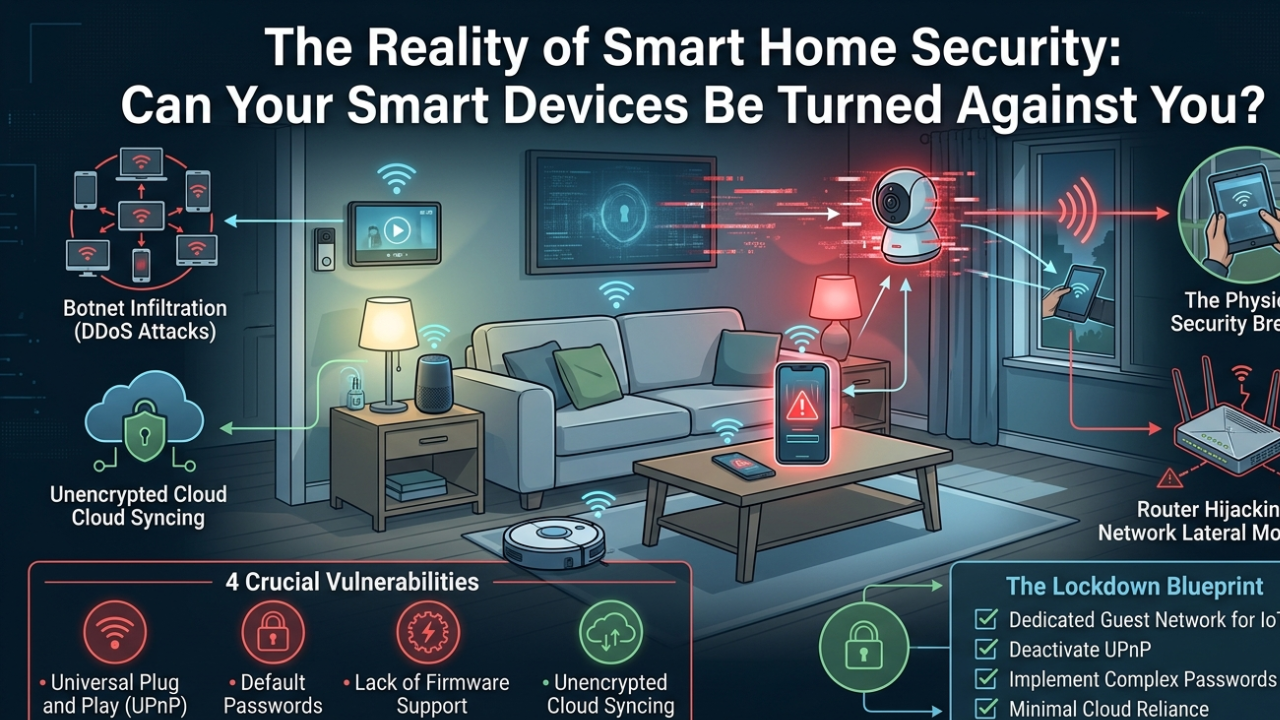
Smart Home Security: We are living in an era where the concept of the futuristic, automated home has successfully transitioned from science fiction into everyday reality. Millions of households globally have embraced the convenience of the Internet of Things (IoT). With a simple voice command or a quick tap on a smartphone screen, you can lock your front doors, adjust your living room thermostat, stream live video feeds from your doorbell camera, or command a robotic vacuum to clean your floors. Smart devices promise unparalleled efficiency, comfort, and an enhanced sense of domestic control.
However, this explosive growth in home automation has brought a critical, often ignored vulnerability into our private sanctuaries. Every single smart gadget you introduce into your household—from a high-tech smart lock to a simple internet-connected lightbulb—acts as a digital bridge connected directly to the outside world. They are data collection nodes that transmit information back and forth through your home Wi-Fi network.
As cyber threats grow increasingly sophisticated, a chilling question has emerged for modern homeowners: What is the true reality of smart home security, and can these very devices be hijacked and turned against you?
In this comprehensive cybersecurity masterclass, we will peel back the marketing hype, analyze the hidden architectural vulnerabilities of common smart home ecosystems, and provide you with a practical guide to locking down your digital architecture safely.
The Invisible Threat: How Smart Devices Become Targets
To understand smart home vulnerabilities, you must first understand why cybercriminals target consumer IoT devices instead of traditional targets like personal laptops or banking applications. Traditional devices like smartphones run on highly advanced operating systems (like Android 16 or iOS) that receive regular, heavy security patches and use robust internal firewalls.
Consumer smart devices, however, are built on an entirely different manufacturing philosophy. To keep production costs low and battery life long, manufacturers pack these gadgets with minimal computing power and memory. They run on stripped-down, lightweight firmware that rarely, if ever, receives security updates after leaving the factory.
Cybercriminals do not just hack smart devices to spy on your daily routine; they utilize them as weaponized entry points. Here are the three primary methods hackers use to turn your smart home architecture against you:
1. The Botnet Infiltration (DDoS Attacks)
Most users assume that a hacker has no commercial interest in a smart refrigerator or an automated toaster. But hackers don’t care about what’s inside your fridge—they care about its processor and internet connection. By utilizing automated malware scripts, cybercriminals scan the global internet for IoT devices running on weak, factory-default passwords. Once found, they inject silent malicious code that links thousands of these compromised gadgets together into a massive, headless digital army known as a Botnet. This computational army is then used to launch Distributed Denial of Service (DDoS) attacks, crashing major global websites and corporate banking servers while the homeowners remain completely unaware.
2. Router Hijacking and Network Lateral Movement
In cybersecurity, your home Wi-Fi router acts as the front gate to your digital life. If a hacker successfully compromises a cheap, unbranded smart security camera sitting in your backyard, they don’t stop there. Once inside that specific device, they execute what is known as Lateral Movement. They use the compromised camera’s trusted connection to move sideways across your internal Wi-Fi network, bypassing your router’s basic defenses to target the high-value assets connected to the same network—such as your personal laptop, workspace files, or online banking sessions.
3. The Physical Security Breach
The most direct threat of compromised IoT ecosystems involves smart locks and connected surveillance cameras. Many budget smart locks communicate via open wireless protocols without end-to-end encryption. A sophisticated attacker sitting in a car outside your house can use basic radio sniffing tools to intercept the digital “unlock” handshake signal sent from your smartphone, allowing them to open your physical front door without leaving a trace.
Also read: Common Android System WebView Glitches
4 Crucial Vulnerabilities Hiding in Your Smart Home

When setting up your home automation network, look out for these four frequent engineering traps that leave your home completely exposed:
-
Universal Plug and Play (UPnP) Activation: Most modern routers come with UPnP turned on by default. This feature allows new smart devices to automatically open communication ports on your firewall to connect to the cloud. While convenient, it essentially allows unverified third-party gadgets to create permanent, invisible backdoors into your local network.
-
The Default Password Crisis: A shocking percentage of consumer smart devices ship with identical, hardcoded factory login credentials (such as Admin/Admin or 12345). If you do not change these manually during the initial setup, your device can be discovered and breached by automated hacker bots within 10 minutes of being plugged in.
-
Lack of Long-Term Firmware Support: Budget tech brands often abandon software support for older models after launching a new version. When a new security vulnerability is discovered in the open-source code used by these devices, abandoned models remain exposed forever.
-
Unencrypted Cloud Storage Syncing: Many cheap smart doorbells send their live video and audio streams to external cloud servers using unencrypted HTTP protocols. This means anyone intercepts your internet traffic can view your private family movements and record active conversations.
The Lockdown Blueprint: How to Secure Your IoT Ecosystem
Protecting your household from digital invasion does not mean you have to uninstall your smart devices and go back to analog keys. By building a disciplined security wall around your home network, you can enjoy absolute convenience without compromising your privacy. Implement this four-step defense blueprint today:
1. Build a Dedicated Guest Network for All IoT Devices
This is the single most effective strategy recommended by cybersecurity experts. Modern Wi-Fi routers allow you to emit multiple wireless signals simultaneously.
-
The Execution: Log into your router’s administrative settings page and turn on the “Guest Network” feature. Connect all your smart TVs, smart lights, smart locks, and smart speakers exclusively to this Guest Network. Keep your personal smartphones, laptops, and hard drives on your Primary Network.
-
The Result: This creates a strict physical sandbox. Even if a hacker breaches an outdoor smart bulb on your guest network, the lateral movement is blocked—they cannot jump across to access the laptop where you store your financial documents.
2. Deactivate UPnP and Audit Active Firewall Ports
Manually control how your home network speaks to the wider internet.
-
The Execution: Open your router’s security dashboard, locate the UPnP (Universal Plug and Play) toggle, and switch it to OFF. If a smart device requires a specific port to function, configure it manually using port forwarding under strict encryption rules, rather than allowing automated devices to open ports at will.
3. Implement the Password-Complex Regime & Turn on MFA
Treat every smart speaker or camera access portal with the same security discipline you reserve for your email account.
-
The Execution: Never use the same password across multiple smart apps. Create complex, alphanumeric phrases for your home automation profiles. Most importantly, open the settings of your primary smart ecosystems (like Google Home, Apple Home, or Samsung SmartThings) and activate Multi-Factor Authentication (MFA). An attacker cannot log into your security camera even if they steal your password, as they won’t have access to the temporary code sent to your physical smartphone.
4. Isolate Local Devices with Minimal Cloud Reliance
Whenever you buy new smart appliances, check if they support localized communication protocols like Zigbee or Z-Wave, or look for local-only control options within your management app. Devices that handle data locally inside your house rather than constantly bouncing signals to external foreign servers are inherently exponentially more secure.
In Short: Convenience Without Compromise
Smart technology is a beautiful addition to modern lifestyle management, but it requires active, conscious digital literacy. By treating your internet-connected appliances as potential entry points, segmenting your Wi-Fi networks, and turning off automated router permissions, you can successfully shield your private life from external digital threats. Build a smart home that works for you—not against you.
Stop ignoring IoT security. Learn how to sandbox your smart home with a simple router trick. Full technical breakdown here: https://t.co/zlAoFi3yzX#SmartHome #Cybersecurity #IoT #TechTrends #SmartDeviceHack #HomeAutomation #Genxsoft #UmeshKumar
— genxsoft (@genxsoftinfo) June 11, 2026